|
|
|
|
About 1098-Ts at USC
 provides our 1098-T tax reporting service.
To download your 1098-T form, please click go to the OASIS Financial Information menu
and click on the link for " 1098T (ECSI)". Or, you may login directly to ECSI at http://www.ecsi.net/1098t . You will be asked to provide your student ID and email information. 1098-T's have been mailed for those who did not choose electronic delivery. note: You will receive an email when your 2012 form is available online...
QUESTIONS about your 1098-T or how to access it online?
Please visit http://www.ecsi.net/taxinfo.html for more information or contact ECSI directly at 866-428-1098 with any questions.
|
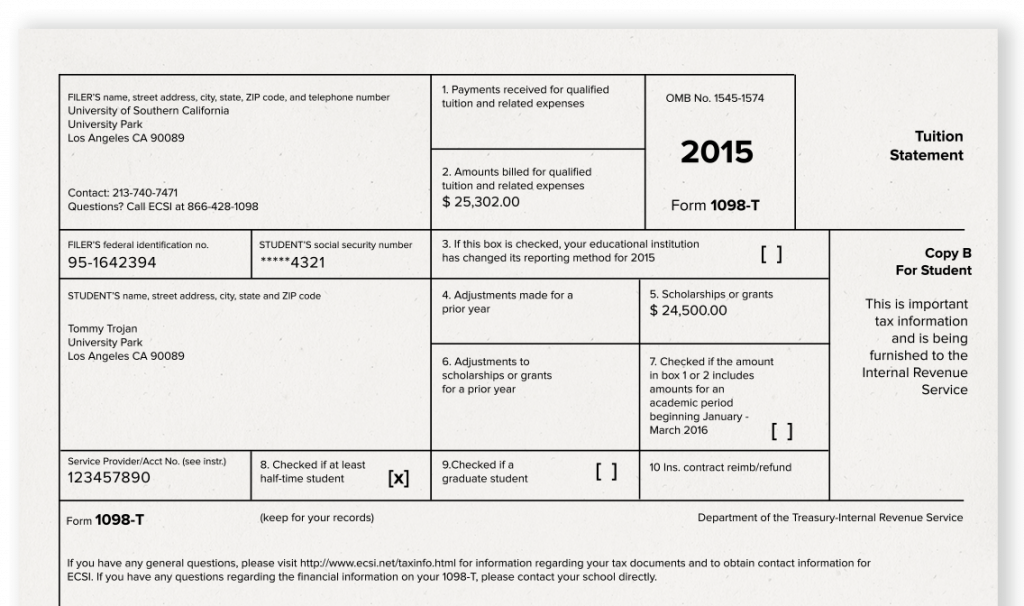
In January of each year, USC sends IRS Form *1098-T* to students with qualified tuition and fees or financial aid posted to their student accounts during the calendar year just ended. This form is used to document education tax credits on United States federal income tax returns.
The majority of international students are *NOT* eligible to claim education expense tax credits on their federal tax forms since, as international students, they do not meet one of these categories:
- U.S. Citizens
- Permanent Residents (PR)
- Married to a citizen or PR
- Can legally be claimed as a dependent by a U.S. citizen or PR, or
- Have been in the US long enough to file taxes as a resident for federal tax purposes
Only students in these categories above can claim education tax credits and use the 1098-T. However, USC provides the form 1098-T to all USC students to accommodate those who may be eligible.
For more information about eligibility, please review I.R.S. Publication 970 at http://www.irs.gov/pub/irs-pdf/p970.pdf . USC employees cannot assist you with your specific tax questions, so you should consult with a qualified tax professional if you need assistance.
Tax preparers and agents who are not familiar with the reporting requirements should be referred to IRS Bulletin 2006-72 and IRS Publication 970. Portions of these documents with pertinent text highlighted are available here.
|
| 1098-T |
The 1098-T is a statement of qualified tuition and fees charged by USC that we provide to the student and to the IRS. Since the 1098-T is intended to assist you in calculating your eligibility for a Hope Scholarship, American Opportunity (new in 2009) or Lifetime Learning Credit, "qualified charges" for this purpose are defined more narrowly than they are for other programs, such as a 529 plan.
To assist you in supplementing your own records, we include a summary of all transactions posted to the student account during the calendar year. We cannot adjust your 1098-T qualified charges to include transactions specifically excluded by the Hope Scholarship and Lifetime Learning credit programs such as room and board. We also cannot your qualified charges to include transactions that took place in other calendar years. You must use your own records of payments in addition to the information about qualified charges we provide to determine your eligibility for a tax credit in any given calendar year.
In general, qualified tuition and related expenses are tuition and fees required for enrollment or attendance at an eligible educational institution. Student-activity fees and fees for course-related books, supplies, and equipment are included in qualified tuition and related expenses only if the fees must be paid to the institution as a condition of enrollment or attendance.
Qualified tuition and related expenses do not include:
- the cost of insurance,
- medical expenses (including student health fees),
- room and board,
- transportation or similar personal, living or family expenses, even if the fee must be paid to the institution as a condition of enrollment or attendance.
Qualified tuition and related expenses generally do not include:
- expenses that relate to any course of instruction or other education that involves sports, games, or hobbies, or
- any noncredit course.
However, if the course of instruction or other education is part of the student's degree program or, in the case of the lifetime learning credit, is taken by the student to acquire or improve job skills, these expenses can qualify. If you have any questions about this, please contact ECSI at 866-428-1098, or go to ECSI's website via OASIS or by going to: www.ecsi.net/1098t and logging in.
IRS regulations require that all institutions assessing qualified charges provide a 1098-T to each student with qualified charges in the year just ended. USC must also file an information return with the IRS for each of these students. We have contracted with a vendor, ECSI, to provide these reporting services for us.
Students: you can now view and print your 1098-T tax form via OASIS. Once you've logged in to OASIS and are on the "Financial Information" page, click on 1098T (ESCI). Clicking on this link will transfer you to the secure website of our 1098-T service provider, ECSI. Click on "Tax Information" and you will see a list of the 1098-Ts USC has provided, by calendar year. Select the 1098-T you wish to view by clicking on the button to the left of the year (this will already be selected if there is only one year on record for you), and then clicking "View." The 1098-T which you have selected will then be displayed and you may print a copy.
If you did not receive your 1098-T, please use the OASIS link to download the form. Please contact ECSI directly at 866-428-1098 with any questions.
|
|
| Credit |
The amount of each credit is determined by the amount paid for qualified tuition and related expenses for students and the amount of the taxpayer's modified adjusted gross income. Education credits are subtracted from your tax but they are nonrefundable. This means if the credits are more than your tax, the excess is not refunded.
The credits are based on qualified tuition and related expenses paid for yourself, your spouse, or a dependent for whom you claim an exemption on your tax return.
|
|
| Report |
Information Reported
On the 1098-T, we report the name, SSN and address of the student, and indicate whether the student was a graduate student or at least half-time during the calendar year.
Institutions are required to report either the payments received for qualified charges or the amounts billed for qualified charges.
Since USC does not identify payments on your student account with specific charges, it is not possible to accurately report amounts paid just for eligible charges, therefore we have elected to report amounts billed (posted to your student account during the calendar year). If you qualify for an educational credit, you should use your personal records and student account statements to determine the amounts that you actually paid toward the charges reported on the 1098-T.
To assist you in calculating your credit, we provide you with information labelled "Transaction History" below the actual form. This information is not sent to the IRS. All transactions posted during the calendar year are summarized by type and academic term. If there is only one type of transaction in a category, you will see specific information.
Transactions for Spring 2012 posted to your student account before January 1, 2012 were included in your 2011 1098-T. These may qualify for a credit in 2012 if you paid them in 2012.
Transactions for Spring 2013 posted to your student account before January 1, 2013, are included in your 2011 1098-T. These may qualify for a credit in 2011 if you paid them in 2011, or in 2013 if you paid them in 2013.
We are required to report all qualified transactions in the actual calendar year during which they were posted to your account, regardless of when you pay them.
If you need more information than is available on your 1098-T form, you may request an account itemization for this purpose:
- by accessing the USCe.pay system and reviewing your statements
- by going in person to use the computer station set up in the lobby of PSB - Parking Structure B and printing out monthly statements
- by using the 'Contact Us' webpage to submit an email request
- by Clicking to Request an itemization of transactions on your student account.
- by contacting the Cashier's Office via telephone: (213) 740-7471
(X) Read more about the financial information reported on your 1098-T
|
|
| Filing |
One change we want to highlight is the expansion of ‘qualified tuition and related credits’ to include expenditures for course materials whether or not they must be purchased from the educational institution as a condition of enrollment.
- Charges for books and equipment billed to your student account will be included on your 1098-T.
- If you have purchased items using your USCard, these will NOT be included in qualified charges on your 1098-T, and you will need to use your own records to substantiate these charges.
- If you have purchased items from the bookstore or other vendor(s) using other payment methods (cash, debit / credit card, check, etc.) you will need to use your own records to substantiate these charges.
Tax preparers and agents who are not familiar with the reporting requirements should be referred to IRS Bulletin 2006-72 and IRS Publication 970. Portions of these documents with pertinent text highlighted are available here.
No USC employee may give tax advice regarding these credits. If you are unsure about your eligibility or have any questions, please consult with a qualified tax preparer.
For information about eligibility and filing for the credits, please refer to IRS Publication 970, 'Tax Benefits for Higher Education.'
Visit the IRS Forms and Publications website at http://www.irs.gov/formspubs/.
To calculate the tax credit, you must file IRS Form 8863 along with your federal income tax return. IRS Publication 970 explains which tuition and fee expenses and which payments qualify for the tax credits. It is your responsibility to determine if you qualify for either tax credit.
|
|
| *emails |
If you have received an email from "webmaster@ecsi.net", this is indeed a communication authorized by USC. ECSI provides our 1098-T tax reporting service and your information will be available on their website. To authorize electronic notification, go to the ECSI Website: 1) from OASIS, click on the "1098T (ECSI)" link Under "My Account", click on "Signup for Electronic Tax Documents". 2) Go to the ECSI Website page for electronic notification sign-up at: http://www.ecsi.net/gateway/1098t-signup.html?school=HT Enter: USC-ID: (your 10-Digit USC ID#) Name: (as found on USC records) Email: (please enter official USC email, ends in '@usc.edu') Read the information about electronic notifications and if you agree, check the consent box, verify your email address, and click the SUBMIT button. If you have difficulty logging in, please contact ECSI directly at 866-428-1098.
|
|
|
Signing up for e-notification: Click <here> to see email text explaining how to sign up to receive an electronic notification when your 1098-T is ready...
|
|
|
|